
If you run a ten person shop, multifactor authentication for small business is the single step that stops the most account break-ins. You can start this week with email and admin accounts, and it moves you closer to what CMMC expects.
The House Small Business Committee has announced a hearing on how CMMC affects small contractors, Inside Defense reports. The committee says it wants stronger security without needless burden on Main Street. MFA is a good place to show both can happen at once.
Is multifactor authentication for small business required under CMMC?
For contractors who handle Controlled Unclassified Information (CUI), yes. NIST SP 800-171, requirement 3.5.3, calls for MFA on network access for every user. It also covers local and network access for admin accounts.
CMMC Level 2 is built on those rules. MFA carries heavy weight in the scoring. Under the CMMC rule, it is not an item you can leave on a plan of action to finish later.
Level 1 is different. It covers Federal Contract Information only, and its 15 basic rules do not name MFA. Even so, stolen passwords are a common way attackers get in, and a second factor makes a stolen password far less useful.
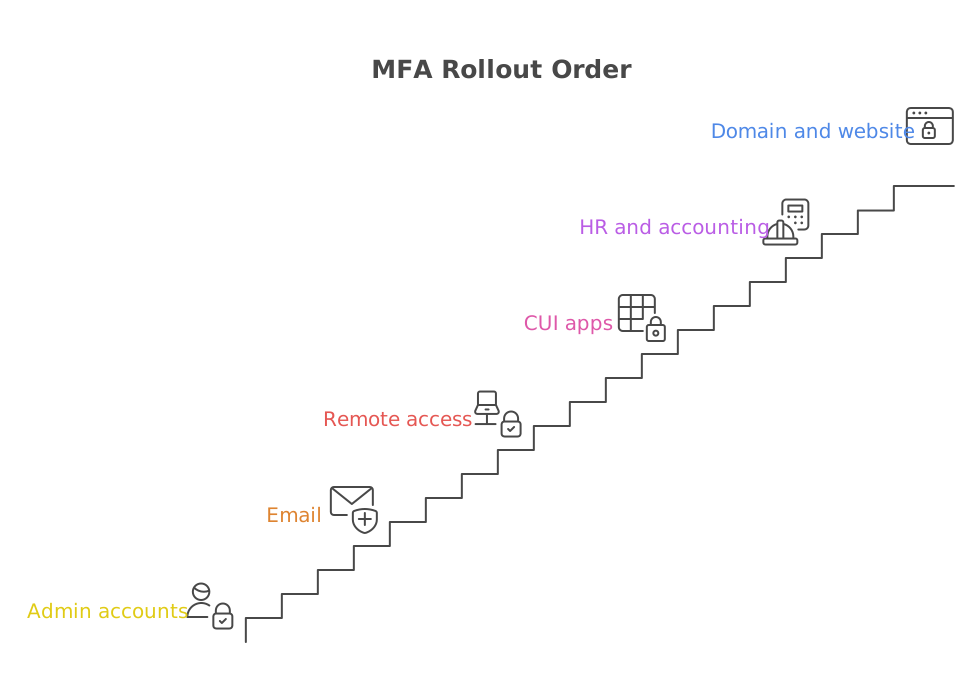
Which accounts should a small team protect first?
Start where one break-in does the most damage. For a ten person shop, this order usually works:
- Admin accounts for Microsoft 365 or Google Workspace. Whoever holds these can reset everyone else.
- Everyone's email. Email is how attackers reset passwords and trick your customers.
- Remote access, like a VPN or remote desktop.
- Any cloud app that stores CUI, drawings or customer files.
- HR and accounting tools.
- Your domain registrar and website host. Many shops forget these.
Make a simple list first. Who has admin rights in your shop today? If the answer is "everyone," fix that while you turn on MFA.
What kind of MFA should we use?
CISA ranks the options. Phishing-resistant methods are the strongest. These include hardware security keys and passkeys built on the FIDO standard.
An authenticator app with number matching is a solid next step. You type a number shown on screen into your phone. That stops people from tapping "approve" on a login they did not start.
Text message codes are the weakest choice. They beat having no second factor, but treat them as a stopgap.
A common path for a small team is an authenticator app for everyone and security keys for admins. Which of your people might struggle with a new app? Plan a few minutes to help them enroll.
What usually goes wrong when a small shop turns on MFA?
- Old sign-in methods stay open. Older email apps can skip MFA. Turn off legacy sign-in in Microsoft 365 or Google Workspace.
- No plan for a lost phone. Set up a backup method and keep recovery codes somewhere safe.
- Shared logins. MFA works best when each person has their own account. Shared accounts also make CMMC evidence harder.
- One admin with no backup. Keep a second admin account, locked down, in case the first gets locked out.
- Nothing written down. An assessor will want to see how MFA is set up. Save screenshots and a short written policy.
Do not switch everyone over on the same morning. Test with two people first, then roll it out.
How does MFA change how my prime and customers see us?
Primes must flow CMMC requirements down to their suppliers. When you can say MFA is on for every account, and show proof, you become a lower risk partner.
It also protects the people who trust you. Attackers sometimes use a small supplier's email to reach a bigger customer. Strong logins close that door.
If your prime asked tomorrow for proof of MFA, what would you send? Cyber Grants Alliance in-kind grants deliver security work and expertise at no cost to you, for shops that cannot staff a security lead.
Want help with the first steps? Learn how Cyber Grants Alliance in-kind cybersecurity grants work, at no cost to you, or apply for in-kind support.
Frequently asked questions
What does this mean for my business?
It means MFA belongs near the top of your list, not the bottom. If you handle CUI, CMMC Level 2 expects it for every user. If you do not, it still blocks many common attacks. Start with admin and email accounts, then write down what you did.
Is a text message code good enough for CMMC?
Text codes count as a second factor, but they are the weakest option. NIST 800-171 asks for multifactor authentication without requiring one method. CISA urges stronger choices. An authenticator app with number matching, or a security key, is the safer path before an assessment.
Do we need MFA if we only handle Federal Contract Information?
CMMC Level 1 does not name MFA in its 15 basic rules. It is still a smart step. Email and cloud accounts get attacked no matter which level you need. Turning it on now also makes a later move to Level 2 easier.
How long does it take to set up MFA for ten people?
For many small shops, the switch itself takes days, not months. The slower part is planning: finding every account, fixing shared logins and helping each person enroll. Test with two people first, then roll out to the whole team.
Do we need a security expert to turn on MFA?
Not always. Microsoft 365 and Google Workspace have built-in MFA settings an owner can switch on. Outside help matters most for the harder parts: legacy sign-ins, remote access and documentation for an assessor. That is where expertise saves the most time.
Sources
- NIST SP 800-171 Rev. 2, Protecting CUI in Nonfederal Systems
- 32 CFR Part 170, CMMC Program rule
- DoD CIO, Cybersecurity Maturity Model Certification
- CISA, More than a Password (MFA guidance)
- Inside Defense, House Small Business panel to convene hearing on CMMC's contractor impacts
- House Small Business Committee post on CMMC and small contractors