
 Cyber Grants Alliance
Attackers are not usually doing anything exotic to small organizations. They are logging in with credentials someone handed over, exploiting software that never got updated, or sending an email that looks like it came from your director, which means a handful of settings you already have access to will block a disproportionate share of what actually hits you.
This matters more than usual right now. SBA and SCORE ran a session for small businesses on the Cybersecurity Maturity Model Certification this month, and the questions in rooms like that are always the same: where do we start when there is no security staff, no consultant on retainer, and a contract officer asking about compliance. The honest answer is that you start with the boring controls, because the boring controls are the ones on the report after almost every incident.
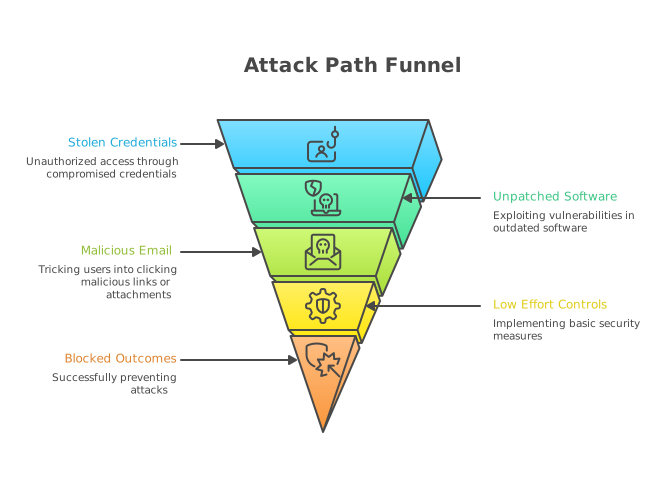
Why do the same few attack paths keep working?
Because they are cheap for the attacker and they scale. Credential abuse, phishing and exploitation of known vulnerabilities have sat at the top of initial access patterns in Verizon's annual Data Breach Investigations Report for years running. CISA maintains a Known Exploited Vulnerabilities catalog specifically because attackers reuse the same handful of proven flaws against anyone who has not patched them.
None of that requires a targeted campaign against you. It requires that you be reachable and unpatched. So the defensive question is not how do we stop a sophisticated adversary, it is how do we stop being the easy one on the list.
When your organization got hit, or nearly got hit, which of those three doors was open?
What should I turn on this week?
Start with identity, because stolen and reused credentials are the most common way in. Turn on multifactor authentication everywhere it exists, and prioritize phishing resistant methods where you can, meaning hardware security keys or platform authenticators rather than codes over text message. CISA has been explicit that SMS based verification is weaker than the alternatives, though it is still far better than nothing.
Then work down this short list:
- Remove standing administrator rights from everyday user accounts. Most ransomware needs elevated access to spread, and a user who browses the web as a local admin gives it that for nothing.
- Turn on automatic updates for operating systems, browsers and the handful of applications your staff actually live in. Check the CISA Known Exploited Vulnerabilities catalog against what you run.
- Block or restrict macros in documents that arrive from the internet. Microsoft made this the default for files from the web, but the setting gets reversed more often than people admit.
- Publish SPF, DKIM and DMARC records for your sending domains so that spoofing your own name gets harder. CISA's guidance treats this as baseline for email hygiene.
- Keep at least one backup copy offline or otherwise isolated, and restore from it on purpose at least once so you know it works. An untested backup is a hypothesis, not a control.
- Remove accounts for departed staff and volunteers the same week they leave. Dormant accounts with valid credentials are a gift.
Are there real government resources for organizations with no security staff?
Yes, and they are underused. CISA publishes a catalog of cybersecurity services and tools available to organizations at no charge, including vulnerability scanning for eligible entities, and the Cross Sector Cybersecurity Performance Goals give you a prioritized baseline written specifically for organizations that cannot implement an entire framework at once.
For cloud tenants, CISA's SCuBA project publishes secure configuration baselines for common productivity suites. If you run Microsoft 365 or Google Workspace and nobody has ever hardened the defaults, those documents tell you what to change and why. The Center for Internet Security also maintains benchmarks and hardened configuration guidance, and state, local, tribal and territorial entities have additional access through MS-ISAC.
Have You Checked What You Already Have Access To?
If you are not sure where your organization actually stands, our in kind readiness support and resources are described at Cyber Grants Alliance.
See Grant Programs →Have you ever actually looked at what your existing licenses already include? That question has surprised a lot of teams we talk to.
How do these controls map to CMMC and NIST 800-171?
Closely, which is the useful part. If you are in the defense industrial base, the CMMC program rule took effect in December 2024 and the acquisition rule that puts requirements into new solicitations took effect in November 2025, phased in over several years. Level 1 covers fifteen basic safeguarding requirements from FAR clause 52.204-21, and Level 2 aligns to the 110 requirements in NIST SP 800-171.
Multifactor authentication, least privilege, account management, flaw remediation, media protection and audit logging are all named requirements in that set. So the work you do to stop commodity attacks is not separate from assessment work. It is the first slice of it, and it produces the artifacts an assessor will later ask to see.
One caution: doing the control is not the same as documenting the control. Assessments look for evidence, policy and consistency over time, not a screenshot. Do not assume that turning something on in March is defensible in December if nobody wrote down who owns it.
What does this not solve?
Plenty. Baseline hygiene does not give you monitoring, incident response capability, a System Security Plan, a scoped enclave for controlled unclassified information, or anyone to call at two in the morning. Comparisons of virtual CISO providers circulated again this week, and for most small businesses and nonprofits those arrangements remain out of reach, which is exactly the gap that keeps otherwise capable organizations stuck.
What baseline hygiene does is buy you time and lower your odds of a self inflicted incident while you work on the harder pieces. It also tells you something useful about your own organization: if you cannot get MFA enabled on every account this quarter, the obstacle is probably not technical. It is ownership. Who in your organization is accountable for saying yes to a change like that? Our who we serve page and CMMC guide cover where to go once the basics are in place.
Frequently Asked Questions
Which single control stops the most attacks?
Multifactor authentication on all remotely accessible accounts, especially email and remote access. Credential abuse is consistently among the top initial access vectors in the Verizon Data Breach Investigations Report, and MFA breaks the attack path even when the password is already stolen. Phishing resistant methods such as hardware security keys are stronger than one time codes sent by text.
Do these basic controls count toward CMMC?
Yes. CMMC Level 1 is built on the fifteen basic safeguarding requirements in FAR 52.204-21, and Level 2 aligns with the 110 requirements of NIST SP 800-171. Controls like multifactor authentication, least privilege, account management and flaw remediation appear directly in those requirement sets, so early hygiene work is genuinely part of the assessment path rather than a detour.
Are government cybersecurity resources actually available to small organizations?
CISA publishes a catalog of cybersecurity services and tools available at no charge, along with the Cross Sector Cybersecurity Performance Goals and the SCuBA secure configuration baselines for cloud productivity suites. Eligibility varies by service, and some offerings are scoped to critical infrastructure or to state, local, tribal and territorial entities. Check the eligibility language on each program rather than assuming.
How often should we test backups?
At least annually, and more often if your data changes quickly or you hold controlled unclassified information. A restoration test is the only way to confirm the backup is complete, readable and recoverable within a timeframe your operations can survive. Keep at least one copy isolated from your production network so ransomware cannot encrypt it alongside everything else.
Is turning on a control enough to pass an assessment?
No. Assessors look for documented policy, assigned ownership, and evidence that the control has operated consistently, not just a current configuration. Implementation and documentation are two separate bodies of work, and organizations routinely underestimate the second one.
We are a nonprofit, not a contractor. Does any of this apply?
The threat side applies identically. Phishing, credential theft and unpatched software do not check your tax status, and nonprofits hold donor records, payment data and sometimes health or immigration information that is attractive to attackers. The regulatory obligations differ, but the baseline controls are the same ones.
Sources: CISA, Cross Sector Cybersecurity Performance Goals; CISA, Known Exploited Vulnerabilities Catalog; CISA, Free Cybersecurity Services and Tools; CISA, Secure Cloud Business Applications (SCuBA) Project; NIST Special Publication 800-171, Protecting Controlled Unclassified Information in Nonfederal Systems and Organizations; DoD CMMC Program, 32 CFR Part 170 and the CMMC acquisition rule amending 48 CFR; FAR 52.204-21, Basic Safeguarding of Covered Contractor Information Systems; Verizon, Data Breach Investigations Report, annual series; SBA and SCORE event listing, Cybersecurity Maturity Model Certification for Small Businesses.